




Motivation
- 개발 시 log에 의존하여 debugging하기 보다는 debugger를 활용하는 것이 생산성에 훨씬 좋다는 것은 주지의 사실
- local이 아닌 Docker를 포함한 Remote에서 동작하는 App에 대해서도 debugger를 활용할 수 있다면 얼마나 좋을까
Idea
-
Delve : Golang Debugger (https://github.com/go-delve/delve)
-
DAP(Debug Adapter Protocol) : 마이크로소프트에서 만든 Debug용 프로토콜
-
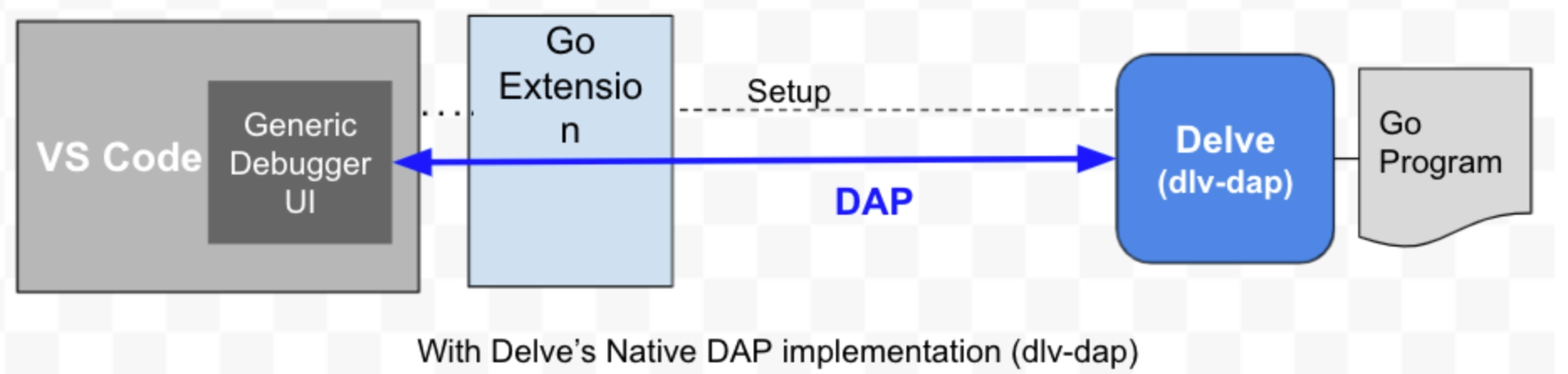
위상 / 동작 구조
- 상기 그림의 좌측은 local machine에, 우측(Delve, Go Program)은 docker container 또는 remote에 위치한 것으로 고려 가능
- remote 또는 docker container 내에서 debugger와 target App이 동작하며, local에 위치한 IDE(e.g. vscode)는 debugger에 대한 monitor, controller 역할(w/ source code)
Requirement
target App은 반드시 debug info를 포함한 상태로 build되어야 함(그래야 debugger가 debugging symbol을 사용 가능. 아래 설정 방법 내 코드 중 RUN CGO_ENABLED=0 go build -gcflags "all=-N -l" . 참조)
설정 방법
아래 코드는 하기
dockebi-go란 sample app의 일부dockebi-goanyflow · 2023-12-25 업데이트

-
target App container image build에서의 동작(in
Dockerfile.debug)
DOCKER... # delve 설치 RUN CGO_ENABLED=0 go install -ldflags "-s -w -extldflags '-static'" github.com/go-delve/delve/cmd/dlv@latest ... # target App 빌드 시 debug 정보 유지 RUN CGO_ENABLED=0 go build -gcflags "all=-N -l" . ... # delve를 통해서 target을 실행(실행 주체는 delve, delve parameter로 target App 설정) ENTRYPOINT [ "/go/bin/dlv" ] CMD [ "--listen=:4000", "--headless=true", "--log=true", "--accept-multiclient", "--api-version=2", "exec", "/app/dockebi-go" ] -
#1을 통해 만들어진 image로 생성(
Makefile의build_image_debugrule 참조)
BASH# image 생성 (Dockerfile.debug 사용) $ docker buildx build . --load --platform linux/amd64 --tag dockebi-go:0.1.0 --file Dockerfile.debug -
생성한 image의 container 실행(
Makefile의run_dockerrule 참조)
BASH❯ make run_docker docker run --rm -p 3000:3000 -p 4000:4000 --name dockebi-go dockebi-go:0.1.0 API server listening at: [::]:4000 2023-12-06T08:51:52Z warning layer=rpc Listening for remote connections (connections are not authenticated nor encrypted) 2023-12-06T08:51:52Z info layer=debugger launching process with args: [/app/dockebi-go] 2023-12-06T08:51:52Z debug layer=debugger Adding target 12 "/app/dockebi-go" -
(vscode의 경우) target App의 source code를 열고, 다음 launch configuration으로 실행(
launch.json에 아래 configuration 추가. 경우 local내 docker에서 동작)
JSON{ "version": "0.2.0", "configurations": [ { "name": "Remote Docker App", "type": "go", "request": "attach", "mode": "remote", "port": 4000, "host": "127.0.0.1" } ] }실행 직후의 모습(in server)
BASH❯ make run_docker docker run --rm -p 3000:3000 -p 4000:4000 --name dockebi-go dockebi-go:0.1.0 API server listening at: [::]:4000 2023-12-06T08:51:52Z warning layer=rpc Listening for remote connections (connections are not authenticated nor encrypted) 2023-12-06T08:51:52Z info layer=debugger launching process with args: [/app/dockebi-go] 2023-12-06T08:51:52Z debug layer=debugger Adding target 12 "/app/dockebi-go" 2023-12-06T08:52:51Z info layer=debugger created breakpoint: &api.Breakpoint{ID:2, Name:"", Addr:0x8ec179, Addrs:[]uint64{0x8ec179}, AddrPid:[]int{12}, File:"/app/main.go", Line:13, FunctionName:"main.main.func1", ExprString:"", Cond:"", HitCond:"", HitCondPerG:false, Tracepoint:false, TraceReturn:false, Goroutine:false, Stacktrace:0, Variables:[]string(nil), LoadArgs:(*api.LoadConfig)(0xc001620720), LoadLocals:(*api.LoadConfig)(0xc001620750), WatchExpr:"", WatchType:0x0, VerboseDescr:[]string(nil), HitCount:map[string]uint64{}, TotalHitCount:0x0, Disabled:false, UserData:interface {}(nil)} 2023-12-06T08:52:51Z debug layer=debugger continuing 2023-12-06T08:52:51Z debug layer=debugger ContinueOnce ┌───────────────────────────────────────────────────┐ │ Fiber v2.51.0 │ │ http://127.0.0.1:3000 │ │ (bound on host 0.0.0.0 and port 3000) │ │ │ │ Handlers ............. 3 Processes ........... 1 │ │ Prefork ....... Disabled PID ................ 12 │ └───────────────────────────────────────────────────┘ -
(vscode) source code에 breakpoint를 넣기. 아래는 넣는 즉식 찍히는 로그
BASH┌───────────────────────────────────────────────────┐ │ Fiber v2.51.0 │ │ http://127.0.0.1:3000 │ │ (bound on host 0.0.0.0 and port 3000) │ │ │ │ Handlers ............. 3 Processes ........... 1 │ │ Prefork ....... Disabled PID ................ 12 │ └───────────────────────────────────────────────────┘ 2023-12-06T08:56:05Z debug layer=debugger halting 2023-12-06T08:56:05Z debug layer=debugger callInjection protocol on: 2023-12-06T08:56:05Z debug layer=debugger 12 PC=0x471d83 2023-12-06T08:56:05Z debug layer=debugger 21 PC=0x471d83 2023-12-06T08:56:05Z debug layer=debugger 22 PC=0x471d83 2023-12-06T08:56:05Z debug layer=debugger 23 PC=0x471d83 2023-12-06T08:56:05Z debug layer=debugger 24 PC=0x40538e 2023-12-06T08:56:05Z info layer=debugger created breakpoint: &api.Breakpoint{ID:2, Name:"", Addr:0x8ec179, Addrs:[]uint64{0x8ec179}, AddrPid:[]int{12}, File:"/app/main.go", Line:13, FunctionName:"main.main.func1", ExprString:"", Cond:"", HitCond:"", HitCondPerG:false, Tracepoint:false, TraceReturn:false, Goroutine:false, Stacktrace:0, Variables:[]string(nil), LoadArgs:(*api.LoadConfig)(0xc0014ca780), LoadLocals:(*api.LoadConfig)(0xc0014ca7b0), WatchExpr:"", WatchType:0x0, VerboseDescr:[]string(nil), HitCount:map[string]uint64{}, TotalHitCount:0x0, Disabled:false, UserData:interface {}(nil)} 2023-12-06T08:56:05Z debug layer=debugger continuing 2023-12-06T08:56:05Z debug layer=debugger ContinueOnce -
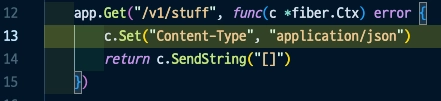
(vscode) breakpoint가 있는 line이 호출되었을 때의 모습
References
https://github.com/golang/vscode-go/blob/master/docs/debugging.md#go-debug-extension-architecture-overview
https://github.com/golang/vscode-go/blob/master/docs/debugging.md#go-debug-extension-architecture-overviewDebugging a Go Application Inside Docker Using VSCodeThe ability to debug is an important tool for a developer to keep in their toolbox. While it's ideal...
 https://dev.to/bruc3mackenzi3/debugging-go-inside-docker-using-vscode-4f67
Debugging a Go application inside a Docker container | The GoLand BlogUpdated and validated on November 17, 2022. You can find more tutorials on how to use containers here. You may also refer to the Docker and Kubernetes sections of our Help documentation. Go develop
 https://blog.jetbrains.com/go/2020/05/06/debugging-a-go-application-inside-a-docker-container/
Comments