



Introduction
GitOps 시대의 git branching 모델 : TBD(Trunk Based Development)에 이어 TBD(Trunk Based Development)의 git 관점 구체 실행 방안을 논한다.
Practice #1 : branch naming
-
release,feature,bugfix,hotfix등의 prefix를 강제하지 않음- gitflow처럼 해당 별도 규칙에 따르는 branch가 없기 때문(
trunk제외)
- gitflow처럼 해당 별도 규칙에 따르는 branch가 없기 때문(
Practice #2 : trunk 관리
-
branch 명명 예 :
master(ortrunkormainormainline) -
참고 : trunk의 본 뜻은 ‘나뭇가지가 자라는 나무의 몸통`
-
안정적으로 관리되는 ‘유일’ branch
-
상시 배포 가능 상태 유지 필요
- 상태 깨질 경우 최우선 복구. 특히 branch merge 직후
- 이를 위해 merge 승인 테스트/자동화 필요
Practice #3 : merge 방법
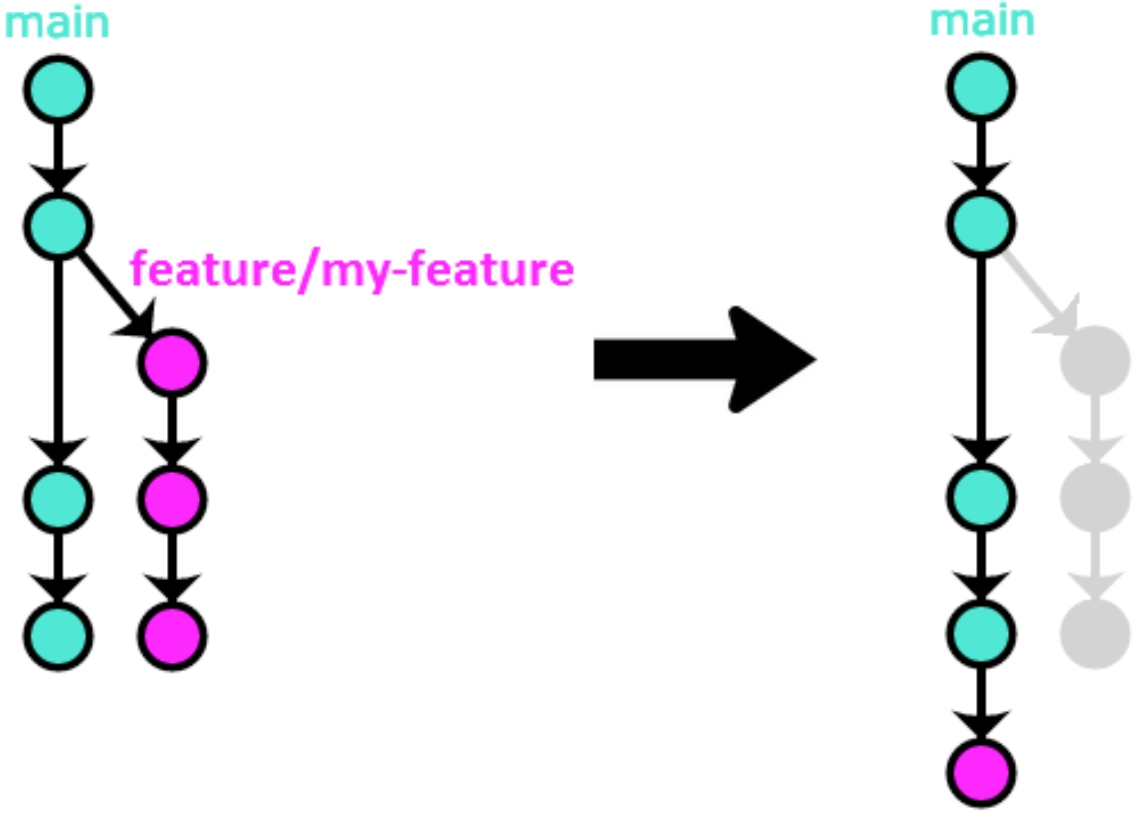
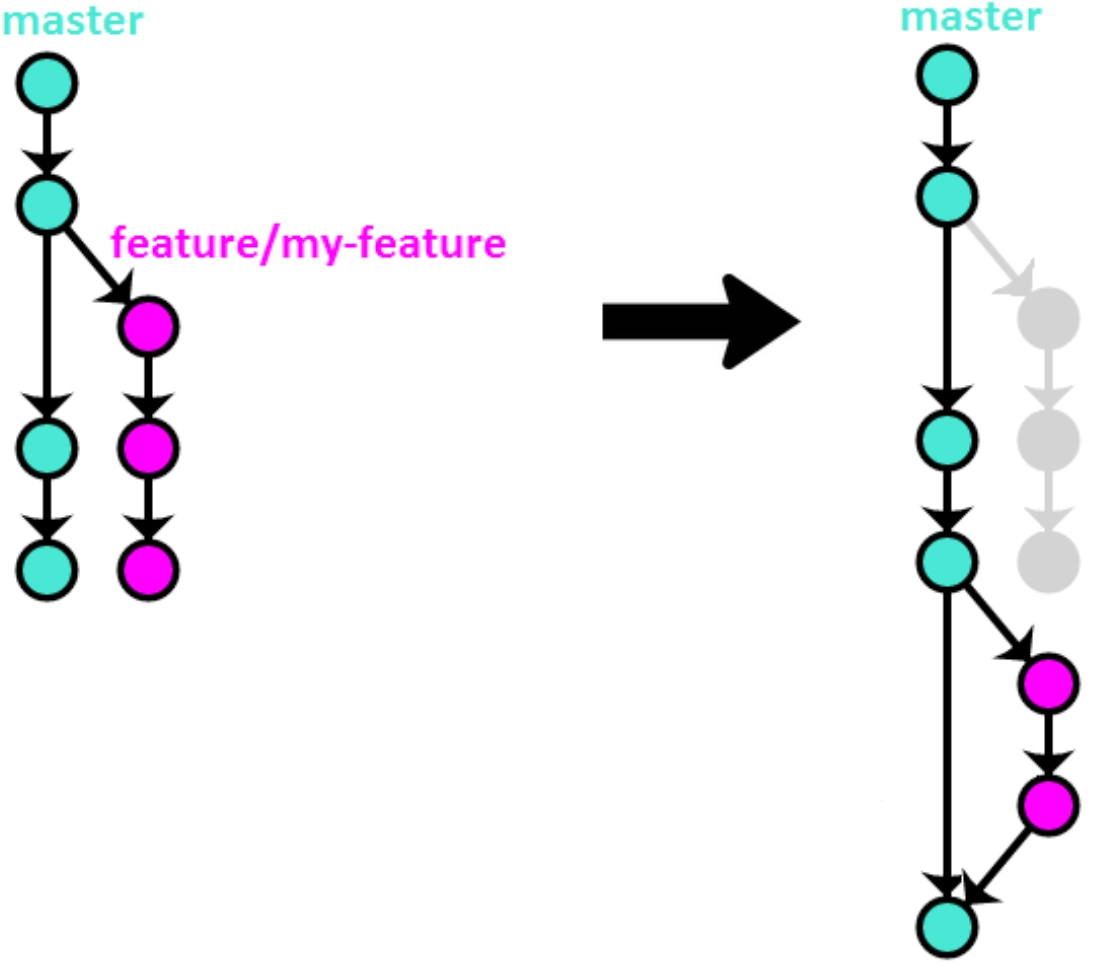
두 가지가 있으나, 첫 번째 방법이 trunk 관리 측면에서 선호되는 듯(하기 그림 및 설명은 OneFlow에서 가져옴. OneFlow는 TBD가 아니나, 제시하는 merging 기법은 TBD에 유리)
-
방법 #1(merge
--squash)- history 정보 일부가 사라지는 문제가 있으나 TBD가 강조하는 단명 branch에서는 큰 문제가 아니며 history 가독성 증대에 유리.
-
방법 #2(rebase + merge
--no-ff)- 현재 많이 사용하는 방법. 방법 #1 대비 history를 유지한다는 장점이 있으나, branch가 많을 경우 history 가독성 떨어지며 자동화가 어려움.
Practice #4 : release 관리
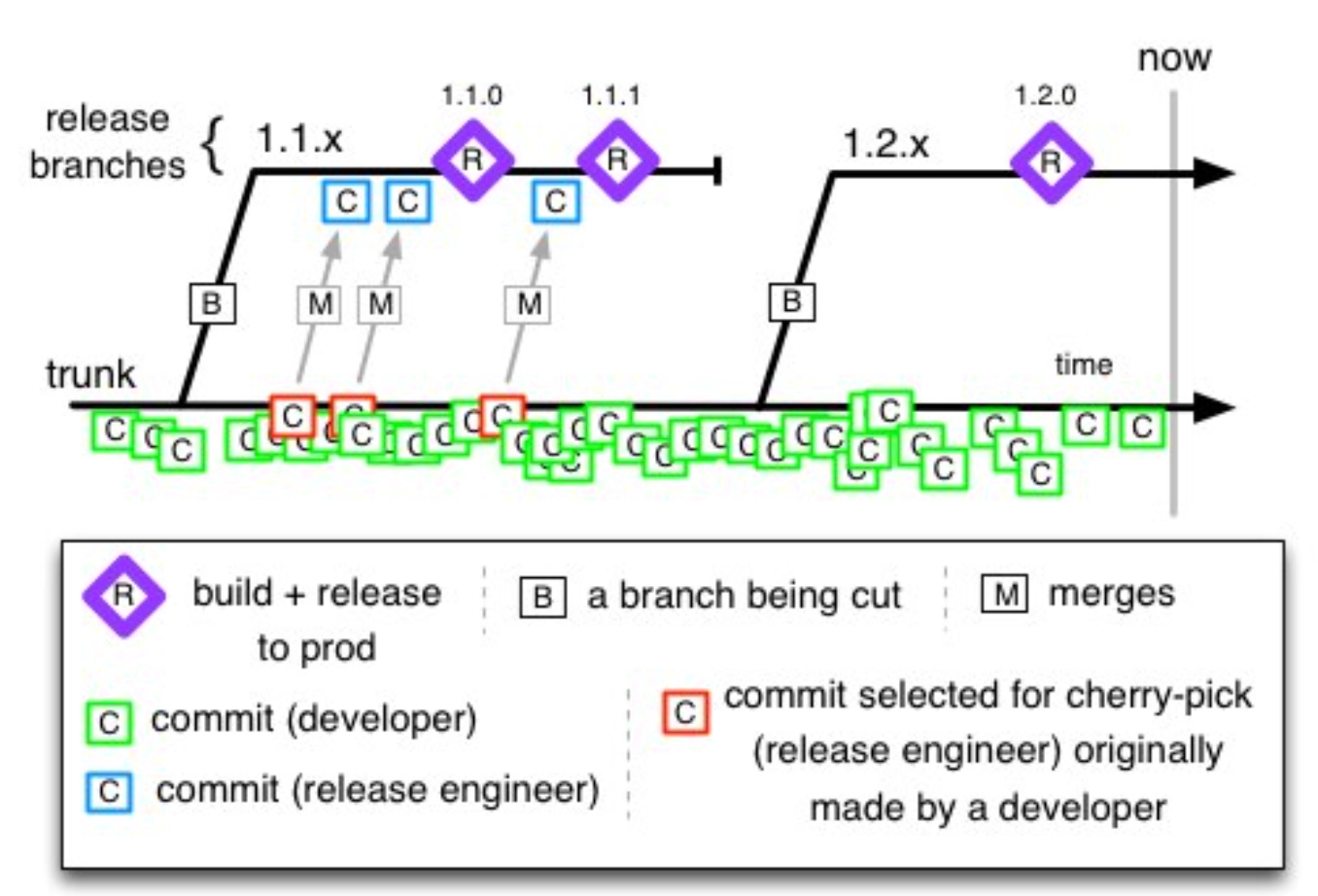
TBD 저자 blog에서 발쵀
-
trunk에서 branching -
releasebranch에 변경이 필요할 때는trunk내 commit을 cherry-picking. -
trunk에 없는 commit이release에 존재해서는 안됨- release branch가 commit 전진을 이루는 경우(즉, release branch 변경이 필요한 경우)는 cherry-picking 만 사용해야 함.
- hotfix는 상기 기능 추가와 동일하게 처리
-
release 완료 후, version tagging
- cherry-picking이 발생하지 않은 경우, tagging은
trunk위의 commit에서 발생 - cherry-picking이 발생한 경우, 해당 release branch의 최종 commit에서 발생
- cherry-picking이 발생하지 않은 경우, tagging은
-
branch 명명 예 :
v1.0.0,1.0.0 -
release,hotfix에서의 commit 발생은 오직trunk로부터의 cherry-pick 뿐 (TBD guide)- cherry-pick 또는 hotfix가 없으면
trunk위의 commit과 commit에서 release 발생
- cherry-pick 또는 hotfix가 없으면
-
참고 : release branch를 다시 trunk로 merge해
- 불필요하기도 하며, 해서도 안됨. 이유는 release branch에만 있는(즉,
trunk에 없는 commit) 모든 commit은 cherry-picking된 것일 뿐이기 때문.
- 불필요하기도 하며, 해서도 안됨. 이유는 release branch에만 있는(즉,
practice #5. 장수(long-live) branch 회피 방안
TBD가 제시하는 방법은 Branch by abstraction과 Feature flags 두 가지이며, 이들 둘 모두, 변경 진행 중인 코드에 의존하는 타 코드에 영향을 미치지 않도록, 즉 변경 중에도 릴리즈를 가능하도록 하는 데 있다.
-
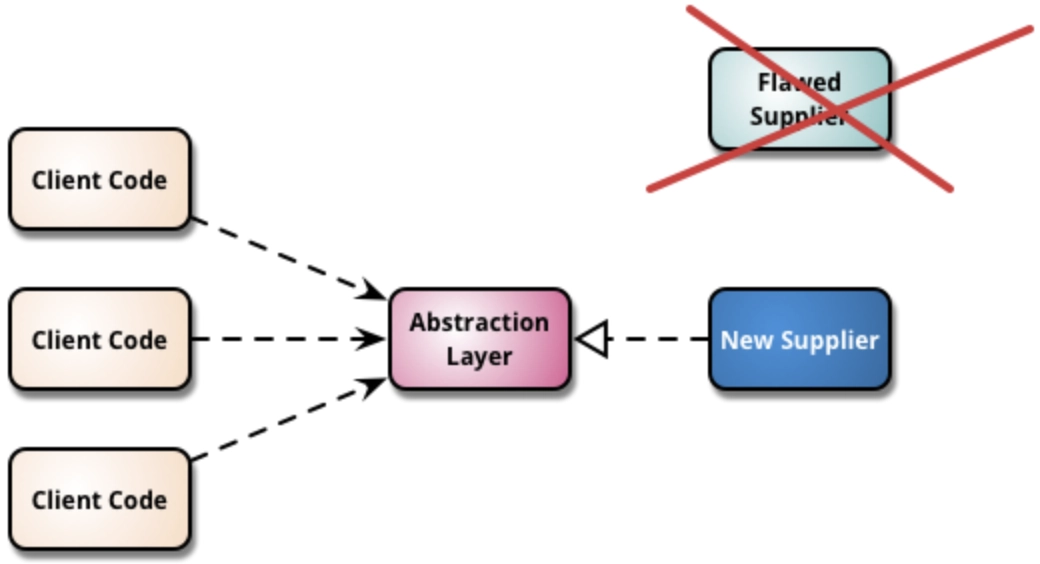
- 클라이언트 코드와 변경 대상 코드 사이에 추상 계층(abstract layer)를 두어 새 코드가 만들어질 때까지 기존 변경 대상 코드를 두고, 완료되면 새 코드로 교체하는 기법(이 때, 추상 계층 덕분에 클라이언트 코드 변경은 불필요)
- 추가 참조 : https://martinfowler.com/bliki/BranchByAbstraction.html
-
Feature flags
- flag의 값(e.g. on/off)에 따라 특정 기능이 다르게 동작하도록 하는 기법. 아래는 극히 단순 sample 일 뿐이고, 본 기법을 상품으로 하는 많은 S/W가 존재
JAVASCRIPTfunction reticulateSplines(){ if( featureIsEnabled("use-new-SR-algorithm") ){ return enhancedSplineReticulation(); }else{ return oldFashionedSplineReticulation(); } }
Appendix #1. TBD의 한계에 관하여
이 모델을 가장 적절히 활용할 수 있는 분야는 지속적 업데이트에 대한 허용 오차가 높으며, 지속적 업데이트가 예상되는 SaaS 제품입니다.
…
설치된 제품이나 모바일 앱을 빌드하는 경우 파이프라인을 통해 업데이트가 제공될 때마다 새 버전을 제작하지 않고, 정기적 릴리스로 변경 사항을 일괄 처리하는 것이 좋습니다.
…
트렁크 기반 개발은 지속적 통합 및 배포와 함께 사용하기 적합합니다. 이 방식은 강력한 자동화 테스트 제품군을 갖추고 여러 버전의 소프트웨어를 지원하거나 릴리스에 따라 업데이트를 구분할 필요가 없을 때 가장 잘 작동합니다. 하지만 이 방식만이 유일한 방법은 아니며, 상황에 따라 다른 브랜치 전략이 더 적합한 경우도 있습니다.
References
 https://blog.banksalad.com/tech/become-an-organization-that-deploys-1000-times-a-day/
 https://betterprogramming.pub/a-simple-git-repository-strategy-93a0c7450f23
 https://docs.github.com/ko/get-started/quickstart/github-flow
 https://www.flagship.io/git-branching-strategies/
 https://dev.to/scottshipp/war-of-the-git-flows-3ec2
 https://statusneo.com/trunk-based-development/
Comments